|
Building A Diskless Folding @ Home Farm
Project: Folding @ Home
Date Written: November 25, 2002
Written By: Jason Rabel
Introduction:
No doubt you have heard of the Folding
@ Home project, which has been going on for well over a year now. The theory
is the client uses your computer's idle CPU cycles to fold proteins to help find medical cures. There are
statistics for each individual & team (if you decide to join one) showing
how much work has been done, and overall rank. This healthy bit of
competition has led people to dig up and recycle whatever working piece of PC
equipment they can find to "fold".
As a folding farm starts to grow, just like in a corporate network you start to experience growing pains and management of all the machines can become a real nightmare. Each machine running its own OS and just folding seems simple enough, which it can be, however the model can be simplified down even more. When I was making folding machine I would try to dig up any hard drive I could that was about 500MB or bigger for whatever bargain price someone was willing to accept. Usually they would run fine for a few weeks then die, or just act up randomly. Needless to say this was a real pain.
By setting up folding machines to boot over the network, it eliminates the need for
a hard drive, and even a video card. Not only does this save you $$$ money $$$ by not
needing as much hardware (which is
always good), but it also reduces the amount of power consumed (another bonus), and reduces the
amount of heat generated (because you are consuming less power). Another BIG reason
to boot from a common file system like this is that it greatly reduces the
effort required to manage & update the systems.
Looking at the picture below, in a nutshell, this is what I have done at
home. I have created a separate network for my folding farm, which is tied into
my existing network so the clients have internet access (to send & receive
work).
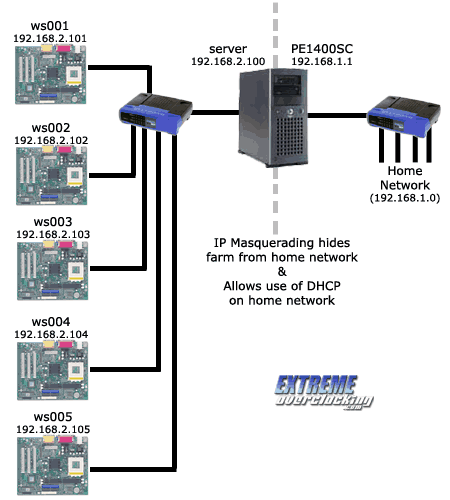
*Side Note: At first I had everything on one subnet, but that meant disabling
the broadband router's DHCP server & setting my regular work machines with
static IPs. That had to be done because you can only have one DHCP server on the
network, otherwise problems can occur. This was a real pain since my network is
ever changing, plus I wanted my farm to be a little less obtrusive. So
instead I decided to create a separate network just for the farm, and the
folding server uses IP Masquerading to route packets between the two networks,
much like your broadband router routes packets between your home network and the
Internet. The only downside is you need a separate hub / switch for the farm, however I think a cheap 10Mb hub would be more than adequate.
This guide was written with a lot of help from a few other sources, with two big ones being key in my success. The first of course being the LTSP documentation, which is also available in other languages. The second source was from a diskless boot setup for a Prime & SETI "monster" farms. My main motivation for writing this guide is to clear up some of the parts that the other ones were a bit fuzzy in, or completely omitted information. If you feel that a certain part of this guide is a little light on information, I suggest checking those links for more info first. Also some parts in this guide I tried to provide links to other sites that had specific info that would be helpful, like the IP Masquerading site.
What is needed:
To start out, you will need the following:
- A PC with a hard drive & two NICs - This will be the "Farm
Server"
- At least one PC with a single NIC and a video card in it (for testing, afterwards you can
remove the video card) - These will be the "Farm Clients"
- A switch or hub, and enough cable to hook up everything
- A copy of your favorite Linux distro (that is on the LTSP supported list),
some LTSP files, and the FAH client (more details on these later)
|





 eWeek is the essential technology information source for builders of e-business. Focuses on e-commerce, communications and Internet-based architecture.
 Oracle Magazine contains technology-strategy articles, sample code, tips, Oracle and partner news, how-to articles for developers and DBAs, and more.
 Dr. Dobb's Journal enables programmers to write the most efficient and sophisticated programs and help in daily programming quandaries.
 InformationWeek is the only newsweekly you'll need to stay on top of the latest developments in information technology.