|
LIUtilities Wintasks 4 Professional
Product: Wintasks 4 Professional
Company: LIUtilities
Street Price: $37.00 USD
Date Reviewed: August 21, 2002
Reviewed By: Vinny D.
Introduction:
Wintasks 4 Professional is essentially a beefed up version of the Windows
Task Manager. At first I was a bit confused about what someone would use this
program for, but after a bit of use I can better understand it's capabilities.
The installation of this program is extremely basic and does not really
require an explanation. Put the CD in and install the program just like you
would install any other windows program. This program requires very little
system resources (10 MB) and will run on Windows 98/NT/2000/XP.
The program's GUI has a very clean interface. At first the number of things
listed may be overwhelming to the average user but after a bit of use it is very
easy to navigate through all of the options.
The Main Window:
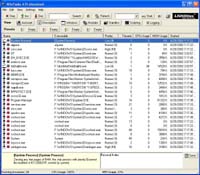
The main window shows all of the processes currently running under windows.
The basic interface allows to you start and stop processes. It also allows you
to change their priority.
At the bottom of the main window is a description section. For native windows
processes it will tell you what each process does. Wintasks also gives you the
option to add notes to other processes for future reference.
The lower section across the top of the main window gives you access to the
rest of the sections of Wintasks Pro.
Autostart:
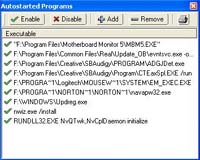
The autostart window allows you to see all the programs that are started with
windows. Although you can do the same exact thing in MSConfig it is nice to have
it right here at your fingertips. Wintasks allows you to add, remove, and
disable items at your leisure with a much easier to use interface that is
present in MSConfig.
Windows:
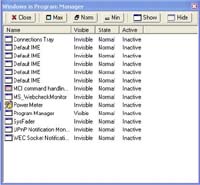
This section of the program allows you to see all the windows that are in use
for a specific process. The thing that makes wintasks very useful in this
respect is that it allows you to see both visible and invisible windows. It
gives you complete control over which windows are visible and allows you to open
and close windows at your leisure.
Modules:
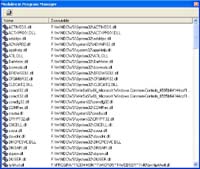
Just like the above section, the Modules section allows you to see all of the
dll's that are in use by a specific process. This is especially useful for
someone who is involved with programming or debugging because it not only tells
you what is in use but also where the file is located. Another use for this
feature is to find rogue programs that you just can't seem to get rid of and nix
the associated dll's.
Continue To Page 2 For The Rest-->
|


 eWeek is the essential technology information source for builders of e-business. Focuses on e-commerce, communications and Internet-based architecture.
 Oracle Magazine contains technology-strategy articles, sample code, tips, Oracle and partner news, how-to articles for developers and DBAs, and more.
 Dr. Dobb's Journal enables programmers to write the most efficient and sophisticated programs and help in daily programming quandaries.
 InformationWeek is the only newsweekly you'll need to stay on top of the latest developments in information technology.